Why This Part Matters
The first useful abstraction in character animation is not a mesh. It is a tree of joints.
If we can describe a character as a root joint with children, and each joint stores a local transform relative to its parent, then we can pose the whole character by propagating transformations through the tree. That is forward kinematics (FK).
This part uses a deliberately simple block character so that you can see the hierarchy clearly and debug the motion without worrying about smooth mesh deformation yet.
Why The Project Starts With A Block Character
The early parts use a blocky articulated character rather than a realistic human mesh.
That is deliberate. A block character makes the hierarchy easy to see:
- each body part is rigid
- each joint is easy to identify
- FK bugs are visually obvious
Once the skeleton logic is clear, we switch to SMPL and study mesh deformation.
Learning Goals
By the end of Part 1, you should be able to:
- explain what a joint hierarchy or kinematic chain is
- distinguish local coordinates from world coordinates
- compute world-space joint rotations and positions from local transforms
- debug a broken articulated character by checking parent-child relationships
- create a short custom motion by placing key poses on a timeline
Minimal Technical Background
Coordinate Convention
In the viewer used for this project:
+zis up+yis the character's forward direction
You do not need prior graphics experience, but you do need to be comfortable with vectors, matrices, and matrix multiplication order.
Skeleton Data
For each joint, the asset stores:
- a joint name
- a parent index
- a local translation from the parent joint to the child joint in the rest pose
For each pose, we also need:
- a local rotation for each joint
- a root translation offset for the whole character
Forward Kinematics
Let joint i have parent p(i).
For the root:
R_world(root) = R_local(root)
p_world(root) = t_root + root_offset
For a non-root joint:
R_world(i) = R_world(p(i)) R_local(i)
p_world(i) = p_world(p(i)) + R_world(p(i)) t_local(i)
This recurrence is the core implementation task for Part 1.
Code Map
Start with these files:
viewer/asset_viewer.pyviewer/student_submission/part1_fk.pyviewer/motion_sequences.pyassets/blocky/marigold.asset.jsonassets/blocky/azure.asset.json
You do not need to understand the entire viewer. Focus on:
- how joint data is loaded
- where the parent array / hierarchy is stored
- where the viewer loads the FK implementation
- how a posed skeleton is turned into a visible character
Part 1 Tasks
Task 1: Run the Viewer and Inspect the Skeleton
Launch the viewer and spend time understanding the data before editing code.
Use the controls to inspect:
- the rigid mesh
- the skeleton overlay
- joint labels and joint handles
- the built-in walk and wave motions
The viewer should give you a direct view of the character, its joint hierarchy, and the timeline controls you will use for testing.
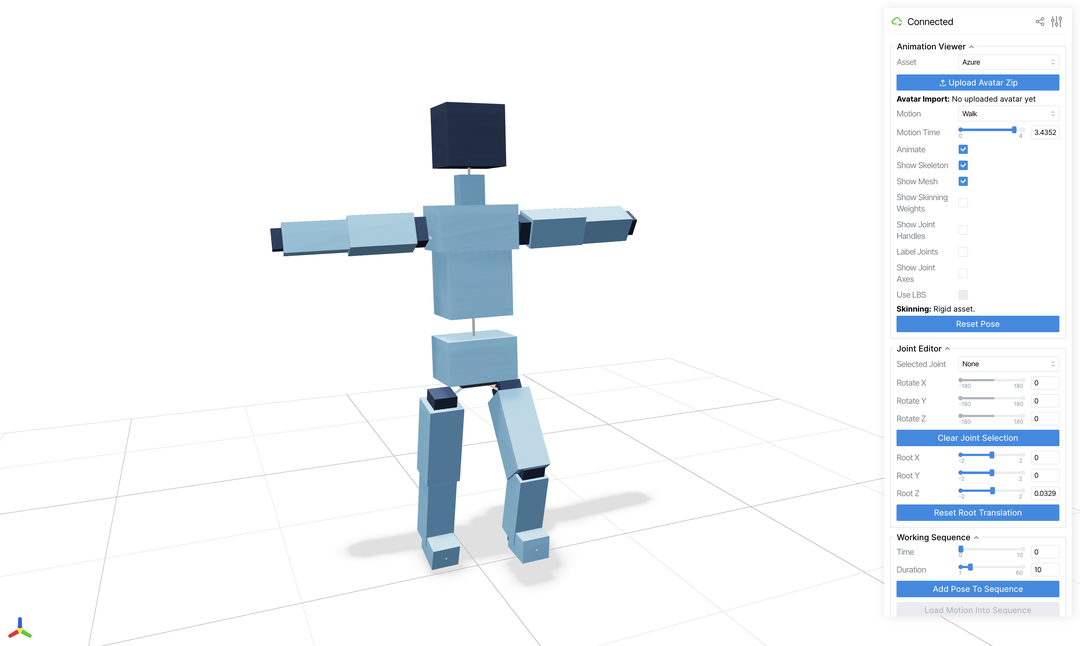
You should be able to point to the shoulder, elbow, hip, knee, and root in the viewer and identify their names in the code.
Task 2: Implement Generic Forward Kinematics
Implement the FK routine in the student starter code.
Requirements:
- the implementation should work for any valid parent-child joint tree, not just one special case
- you should not rely on the joint list already being in parent-before-child order unless the starter code explicitly gives you a topological order
- the output must be one world rotation and one world position per joint
In plain language, this means:
- your code should work if we change the character but keep the same kind of skeleton data
- your code should work if joints appear in a different order in the file
- your code should use the parent relationship, not hardcoded assumptions such as "joint 3 is always processed after joint 2"
At minimum, your implementation should be correct for both provided block characters.
Task 3: Validate the Implementation
Use the viewer to test your FK implementation on the provided motions.
Check at least the following:
- rotating a shoulder moves the elbow and wrist
- rotating a hip moves the knee and ankle
- world-space joint positions follow the hierarchy correctly
- the rigid blocks stay attached to their assigned joints
You should actively look for failure cases such as:
- children moving without the parent
- joints rotating in place but not translating correctly
- mirrored or reversed motion caused by incorrect multiplication order
Task 4: Author a Custom Motion
Create one short motion clip using the timeline tools in the viewer.
Requirements:
- at least
10keyframes - use the provided interpolation; you do not need to implement interpolation in this part
- the motion must involve at least one arm chain and one leg chain
- include a clear beginning, middle, and ending pose
- include either root translation or visible body-weight shift
- the result should be saved to the motion library and exported as a short video
Examples:
- step forward, crouch, jump, land, and recover balance
- wave to someone, turn the body, step sideways, and wave again
- prepare, kick, recoil, and transition into a different pose
- take two dance steps with coordinated arm motion and a final pose
- reach down, pick up an imaginary object, stand, and present it
Choose a motion phrase rather than a single isolated action. It should be simple enough to debug, but non-trivial enough that bad FK would be obvious.
What To Bring To Help Sessions
If you get stuck, bring a concrete debugging example:
- a screenshot with a broken pose
- the joint chain that is behaving incorrectly
- the part of the FK recurrence you are unsure about
That will make the help sessions much more productive than saying "the motion looks wrong".
Part 1 Output
By the end of this part you should have:
- a working FK implementation
- one saved custom motion clip with at least
10keyframes - one short exported video showing the result
This work feeds directly into Part 2, where the same motion will be reused on SMPL.
There is no separate report submission at the end of Part 1. Keep these files and figures ready for the interim submission:
- your code
- one custom motion clip from the viewer
- one short exported video
- one screenshot of the skeleton or joint hierarchy in the viewer
- one screenshot or frame from your custom motion
For the report requirements, see the interim report section in Part 2.